
Faster and smarter way to solve any doubt in Agentia with Headless In App Support

By Martin Borthiry
Developers working with CI/CD often lose valuable time switching between terminals, documentation, browser tabs, support portals, and IDE windows. Even when the answer exists, finding the right command or understanding the current execution context can interrupt the flow of work.
Agentia Support is designed to reduce that friction.
It provides an interactive Copado support experience directly through Agentia Headless. Developers can ask questions from the Agentia CLI or invoke the same experience from the Agentia IDE Extension without leaving their local environment.
The experience is available through:
agentia support
agentia help-agent
agentia help --agent
Agentia Support is available starting with Agentia CLI version 1.7.0.
Agentia Support is powered by Copado AI and Copado-focused product knowledge. It specializes in Copado CI/CD, Copado Testing, Agentia CLI, the Agentia IDE Extension, MCP integrations, and related headless workflows.
Instead of offering generic answers disconnected from the developer’s situation, Agentia Support can use sanitized local context to make its guidance more relevant.
Support that understands the local workflow
When a developer starts an Agentia Support conversation, the CLI prepares a bounded diagnostic context. This can include basic non-secret configuration, the active operating environment, the current Agentia version, whether the interaction originated from the CLI or IDE, and a sanitized summary of recent commands.
This allows Copado AI to understand more than the question alone.
For example, a developer might simply ask:
Why did my last deployment fail?
Without context, an assistant would need to ask several follow-up questions. Agentia Support may already see that the developer recently inspected a failed Copado job, checked a User Story, or ran a promotion-related command.
It can then provide more focused guidance, such as recommending the relevant job-detail or log command and explaining which failed step to inspect.
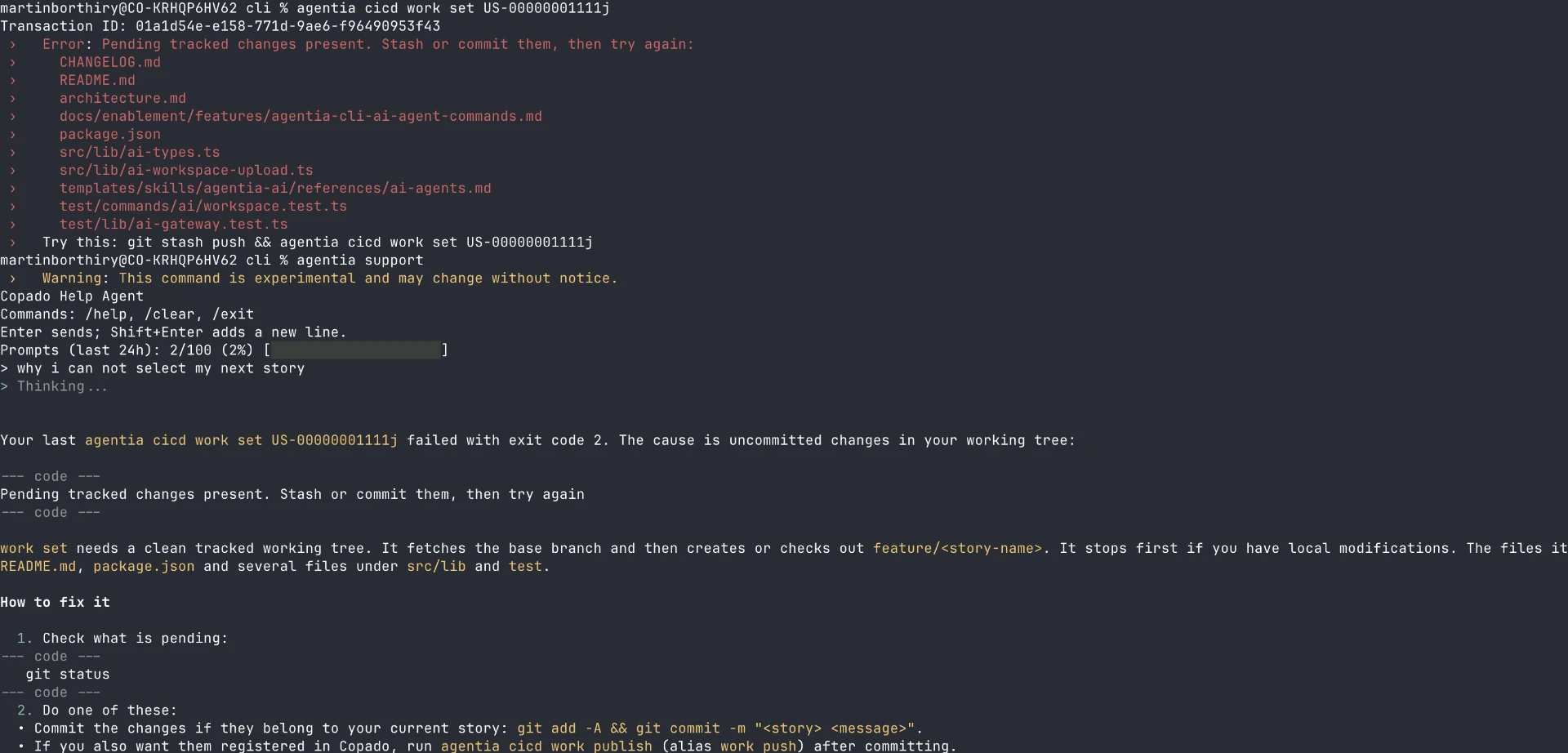
Agentia Support does not send unrestricted terminal history. Local history is bounded and sanitized before it is included. Credentials, tokens, session IDs, request bodies, complete local paths, environment variables, and other sensitive values are excluded or redacted.
The goal is to provide useful operational context without turning local history into an uncontrolled data source.
Available from the CLI and IDE
Agentia Support is not limited to a standalone terminal session.
The same support capability can be used from Agentia IDE workflows. The context identifies whether the developer is primarily operating through the CLI or IDE, allowing the assistant to tailor its guidance.
In the Agentia IDE Extension, open the Copado Support section in the sidebar and click Get Copado Help to start a support conversation without leaving the editor.
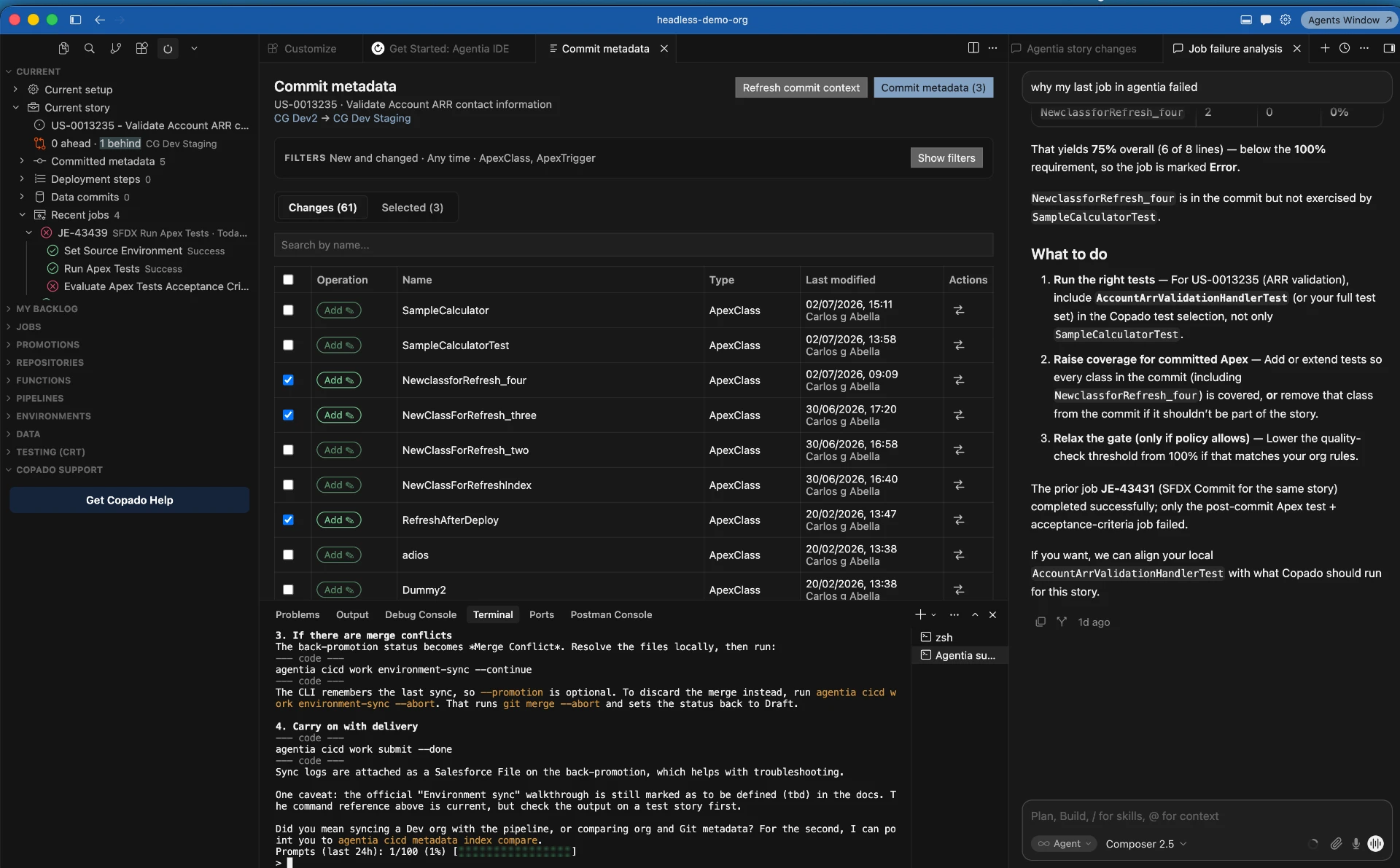
A CLI user might receive a direct command example:
agentia cicd job get <job-id>
An IDE user might instead receive guidance that reflects the views and actions available through the Agentia IDE Extension while still including the equivalent CLI command when useful.
This distinction matters because developers may be following different workflows even when they are working with the same Copado records. Some teams rely heavily on terminal automation, while others work primarily through the IDE and use the CLI only for advanced operations.
Agentia Support is designed to recognize that difference.
Illustrative examples
The following scenarios are fictional examples intended to demonstrate the type of assistance Agentia Support can provide.
Example 1: Understanding a failed job
A developer runs:
agentia cicd job get <job-id>
The returned job has an error status and contains a failed deployment step. The developer then opens Agentia Support and asks:
What should I check next?
Because recent sanitized command context is available, Agentia Support can understand that the question relates to a failed Copado job rather than providing a generic troubleshooting checklist.
A possible answer could be:
The job completed with an error in the deployment step. Inspect the result log for the failed step and verify whether the failure comes from metadata validation, Apex tests, or missing dependencies. Use the job log command with the relevant step or result ID.
The developer receives a focused next action without copying an entire job response into the prompt.
Example 2: Choosing between local and cloud operations
A developer asks:
Should I commit this from my local repository or use the cloud flow?
The recent context indicates that the developer is working from the IDE, has an active User Story, and recently used cloud commit-context commands.
Agentia Support could explain:
Your recent activity suggests that this project is using the cloud delivery flow. Continue with the Agentia cloud commit workflow unless the project workflow configuration explicitly allows local delivery. You can inspect the active workflow before proceeding.
This reduces the risk of mixing incompatible local and cloud workflows.
Example 3: Authentication guidance
A new user asks:
Why does agentia support fail on my machine?
Agentia Support can explain that the support capability currently requires Copado CI/CD authentication because each interaction obtains a short-lived authorization token through the CICD Gateway.
It might suggest:
agentia auth get --cicd
If authentication is missing, the user can configure it using the appropriate CICD API key and region.
This is more useful than asking the user to configure a separate Copado AI credential, because Agentia Support does not require a separate AI PAT for this workflow.
Example 4: Help from the IDE
A developer working through the Agentia IDE Extension encounters a promotion error and asks:
Can you explain what this status means?
The assistant can recognize the IDE origin and provide concise guidance suitable for the current workflow:
This promotion has started, but one deployment job ended in error. Open the associated job from the IDE to inspect its failed step, or retrieve the same details with
agentia cicd job get <job-id>. Validate the error before restarting or continuing the promotion.
The developer can remain inside the IDE while still receiving commands that are useful for automation or deeper diagnosis.
Example 5: Discovering Agentia capabilities
A user asks:
How can I see which metadata changed before I commit?
Agentia Support can explain the relevant Agentia metadata and commit-context capabilities, distinguish local and cloud operations, and provide a short sequence of commands based on the detected workflow.
This helps developers discover features without reading the complete CLI reference first.
A conversational experience
Agentia Support streams responses as they are generated, so users can begin reading immediately instead of waiting for the complete answer.
The conversation retains bounded context during the current session. Follow-up questions can therefore reference the previous exchange.
For example:
Why did this job fail?
Followed by:
What command should I run to retrieve that step’s log?
The CLI resends the necessary bounded conversation and local context with each request because the AI service does not act as permanent conversation storage.
The interactive experience also includes a usage footer showing:
- Prompts consumed during the last 24 hours
- The percentage of the allowance used
- A colored horizontal usage bar
An example footer is:
Prompts (last 24h): 24/100 (24%) [█████░░░░░░░░░░░░░░░]
Current availability and limitations
Agentia Support is currently exclusive to paid Copado CI/CD customers and requires Agentia CLI version 1.7.0 or newer.
A valid Copado CI/CD authentication setup is required. The command can open without performing an eager credential validation, but sending a question requires the CICD Gateway to issue a fresh, short-lived token for Copado AI.
The current limits and boundaries include:
- A maximum of 100 accepted prompts per rolling 24-hour period
- Usage is measured locally for the current operating-system user
- The feature is experimental and may evolve
- Questions should relate to Copado products and Agentia workflows
- Agentia Support is not intended to be a general-purpose AI assistant
- Local context is bounded and sanitized, so it may not contain every relevant diagnostic detail
- Responses can be incomplete or incorrect and should be validated before critical operations
- Suggested commands are not executed automatically
- Network and Copado service availability are required
- Restarting the chat or clearing the conversation does not reset the prompt allowance
The prompt allowance is rolling rather than resetting at a fixed time. As older prompt timestamps leave the 24-hour window, capacity becomes available again.
Privacy and security by design
Agentia Support treats local command history and AI responses as untrusted data.
Before recent command information is stored or sent as context, Agentia applies redaction and size limits. Sensitive command parameters are removed, output is bounded, and complete filesystem paths are reduced.
The support context is designed not to expose:
- CICD API keys
- AI credentials
- Salesforce access tokens
- Session IDs
- Authorization headers
- Request bodies containing sensitive values
- Environment variables
- Full local filesystem paths
The short-lived AI token is requested for each interaction and is never persisted as part of command history.
This approach provides useful operational context while limiting the amount and sensitivity of information shared with the AI service.
The impact for Copado users
Agentia Support can significantly improve the developer experience by making Copado expertise available at the point of work.
Users spend less time:
- Searching documentation for the correct command
- Copying large error responses into external tools
- Switching between the IDE, terminal, and browser
- Determining whether they are following a local or cloud workflow
- Understanding unfamiliar Copado job and promotion states
- Discovering the Agentia command that corresponds to an IDE action
It can also help teams establish more consistent workflows. New developers receive guidance aligned with Agentia and Copado tools, while experienced developers gain a faster way to investigate errors and discover less familiar capabilities.
Agentia Support does not replace documentation, automated validation, or human support. It creates a faster path between them.
What is coming next
Today, Agentia Support focuses on conversational guidance inside headless development workflows.
The next step is deeper integration with Copado Support.
Soon, we plan to provide direct access to support cases and escalation workflows from Agentia headless tools. This will make it possible to move from an AI-assisted investigation to human support without manually reconstructing the problem in another system.
A future workflow could allow the user to:
- Ask Agentia Support about a failed operation.
- Review the suggested troubleshooting steps.
- Create or access a Copado Support case from the CLI or IDE.
- Attach an appropriately sanitized conversation and diagnostic context.
- Continue updating the same case as the investigation progresses.
- Escalate to Copado Support when AI guidance is not sufficient.
This will connect local developer assistance, Copado AI, operational context, and human support in one workflow.
Agentia Support represents an important step toward making Copado expertise available wherever developers work—whether that is the terminal, the IDE, or another Agentia headless experience.